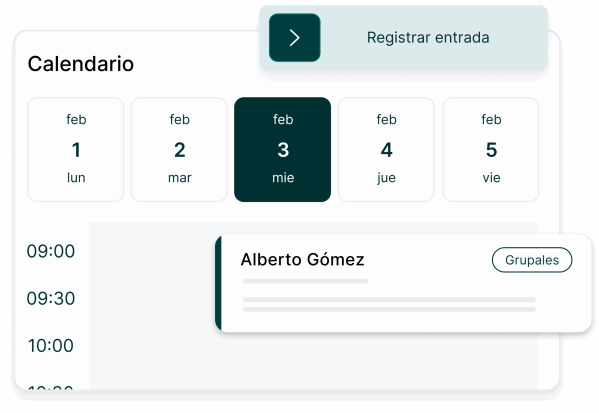
In March 2023 we described Lueira in one sentence: bookings, staff and stock in one place for mountain sports schools. Since then we've written about the booking engine that customers use to reserve a class, and about the AI agent that answers them on WhatsApp. Lueira Team is a different piece entirely, and a smaller one on paper: a mobile app instructors — monitores, as schools and instructors themselves call them — use to see the day's planning, check who's in their group and what the activity involves, and clock in and out. We built it expecting it to be one more surface on top of what we already knew about Lueira. It turned out to be a lesson in how wrong that expectation was.
1. A different user than everyone else on the platform
Every other part of Lueira we've written about serves either the school's owners or their customers. The backoffice is built for someone sitting down, planning a week, reconciling bookings against staff availability, looking at numbers. The booking engine and the WhatsApp agent are built for someone deciding whether to book a lesson and then confirming it. Lueira Team serves neither. It serves the instructor standing at the bottom of a ski lift, or on a beach next to a stack of surfboards, who needs to know one thing before their next activity starts: who's in the group and what, if anything, they need to know about them.
Our first pass at the app didn't fully register that difference. It was closer to a mobile version of the backoffice's information density than we'd like to admit — the instinct to show a full day's schedule, contact details, booking history, whatever else the data model already had, because it was there and it seemed useful. It wasn't wrong that the information existed. It was wrong to assume that having it meant it belonged on that screen. An instructor pulling out their phone between two lessons isn't reading a report, they're glancing at it, and the first version asked for more attention than that moment could give.
What instructors actually needed was closer to the opposite of a dashboard: the next activity, who's in the group, and any special note attached to it — an allergy, a beginner who needs more time, a change in the meeting point — and nothing else competing for that glance. We'd already run into a version of this problem with NaturPark's field app for rangers, where the same instinct to bring desk-grade detail into the field had to be walked back.
2. Designing for spotty connectivity and short glances
The other function Lueira Team has to get right is clock-in and clock-out — entrada and salida — which sounds almost administrative until you notice where instructors actually are when they need to tap it: at the bottom of a slope, on a boat, standing in a wetsuit at the edge of the water. Mountains and water are both places where a phone's connection is, at best, a suggestion. If clocking in required a live round-trip to our servers at the exact second someone tapped the button, it would fail constantly, in exactly the moments it matters most.
We designed around that instead of hoping connectivity would cooperate. The action gets recorded locally, with its real timestamp, the moment it happens, whether or not the phone has a signal right then. It gets synced to Lueira's backend as soon as a connection is available, silently. The instructor's experience is that clocking in always works; the truth underneath is that it doesn't need a connection to work, only to eventually be confirmed.
That reliability has a second, quieter payoff: worked hours logged automatically, at the moment they happen, are a better record for payroll than an instructor reconstructing their day from memory a week later.
3. Assuming interruption instead of a clean flow
The last assumption we had to drop was that an instructor's use of the app would look like a session: open it, do the thing, close it. Outdoors, with clients depending on you and conditions changing under your feet, that's not a given — an instructor can start clocking in, get pulled away by a client's question or something closer to an actual emergency, and come back to finish what they started minutes or hours later.
Lueira Team had to be built to assume that interruption is the normal case, not the exception. That means every action has to be safe to abandon halfway and safe to resume without the instructor re-entering anything.
None of these three lessons were things we could have derived from how the rest of Lueira works, because Lueira Team's user isn't like any of the others we'd already designed for. Building it meant relearning, on a smaller screen, the same thing we'd already half-learned with NaturPark: an app built for someone outdoors and interrupted needs less on the screen and more discipline underneath it than an app built for someone at a desk.